TrueGear Device Overview

ME Series Haptic Suit: components, charging, fitting, and precautions

Package Contents

Haptic suit: 1

EMS armbands: 2

EMS modules: 2

Split Type-C data cable: 1

Type-C to USB data cable: 1

Bluetooth adapter: 1

Small spray bottle

User manual: 1
Product Overview

Product Overview
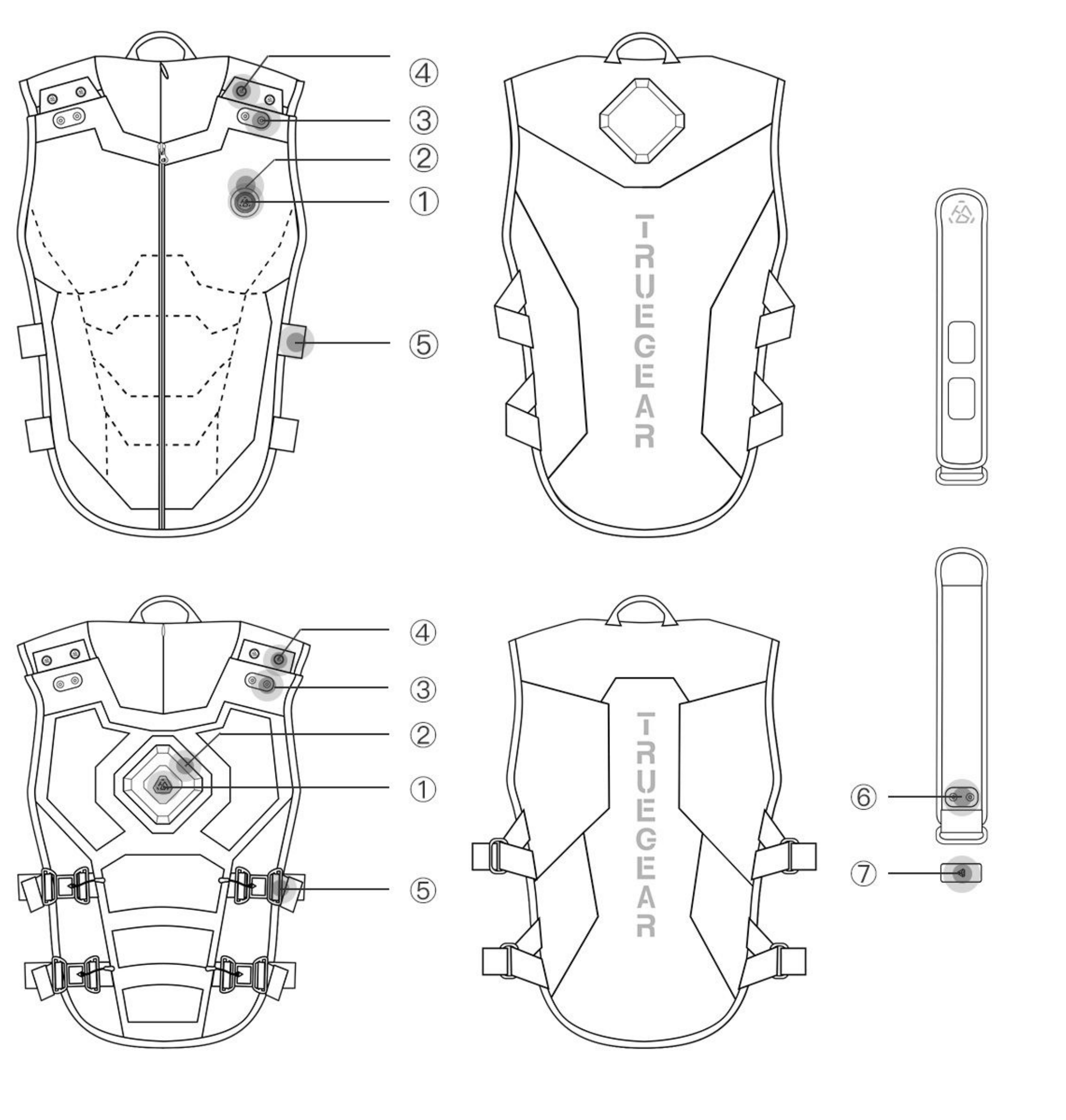
  • ①Power Button
  • ②Power Indicator Light
  • ③Magnetic Charging Buckle
  • ④Shoulder Height Adjustment Buckle
  • ⑤Girth Tightness Adjustment Buckle
  • ⑥Armband Magnetic Fastening Buckle
  • ⑦Electrical Stimulation Power Button

Charging and Battery Indicators

Battery and Charging Indicators
1. A yellow indicator (② or ⑦) means the battery is low and needs charging. Charge the suit through the Type-C port beside indicator ②. To charge EMS modules ⑦, attach them correctly to the magnetic charging clips ④ on the suit's shoulders.
2. Indicators ② and ⑦ slowly pulse green while charging.
3. Indicators ② and ⑦ stay green when charging is complete.

Power Controls

Turn on the suit
Press and hold power button ① for 3 seconds. Indicator ② flashes blue.
Turn on the EMS modules
Press and hold power button ⑦ on each EMS module for 3 seconds. Each indicator ⑦ flashes blue.

Fitting the Vest

Complete charging, pairing, and the PC connection before putting on the suit. Once it is fitted, use TEST in TrueGear Player to check its response.
Before putting it on, review who should not use the product and the safety precautions.
① Open the front and rear elastic buckles
Open the front and rear elastic buckles before putting on the vest to make it easier to wear.
② Put on the vest and adjust the shoulders
Put on the vest. Use the shoulder adjustment buckles to adjust its height to fit your body.
③ Tighten the waist straps
Tighten the elastic straps around your torso to secure the vest to your body.

Fitting the Armbands

Fitting the Armbands
Skip the following armband steps if you are not using electrical stimulation.
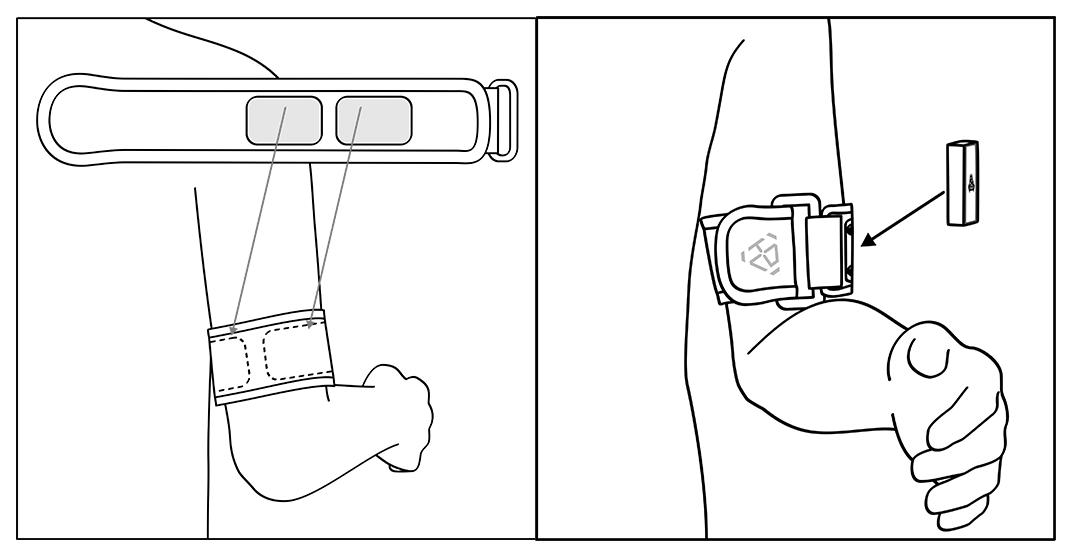
① Wrap the armbands around your upper arms
Position the two conductive rubber pads against the skin on the back of your upper arm, over the triceps. Do not wear EMS devices on other parts of the body outside the arms.
If your skin is dry, lightly moisten its surface with the included small spray bottle to improve contact between the pads and your skin.
② Attach the EMS modules
Align each module's magnetic part with the magnet on the armband. Press gently and check that it is securely attached.
③ Check the fit and attachments
Check that the vest is secured to your body, the armband pads touch the back of your upper arms, and the modules are securely attached.

Motion Sensor Module Specifications

Electrical Stimulation Module Parameters

Number of Electrodes
4
Electrical Stimulation Channels
2
Voltage
0-120V
Current
0-8mA
Pulse Width
0-150μs
Frequency
1-100Hz
Battery Capacity
3.7V 400mAh/1.48Wh
Charging Power
DC 5V 0.6A MAX

Vibration Module Parameters

Number of Vibration Points
40
Motor Speed
9000±2000RPM
Battery Capacity
3.85V 10000mAh/38.5Wh
Charging Power
DC 5V 1A MAX
ME01 Open Front Size Chart
Universal size unit (CM)
Body length from shoulder point
58, adjust to 62 maximum
1/2 chest
35, adjust to 65 maximum with buckle strap
1/2 hem
30, adjust to 62 maximum with buckle strap
Shoulder width
37
Neck width
19
Front neck drop
15, adjust to 19 maximum
Arm loop width
6
Arm loop length
38
ME02 Pullover Size Chart
Universal size unit (CM)
Body length from shoulder point
56, adjust to 60 maximum
1/2 chest
35, adjust to 65 maximum with buckle strap
1/2 hem
30, adjust to 61 maximum with buckle strap
Shoulder width
37
Neck width
19
Front neck drop
13, adjust to 17 maximum
Arm loop width
6
Arm loop length
38

Manufacturer

Fuzhou Yuyuan Garment Co., Ltd. / Fuzhou Yiheng Technology Co., Ltd.
Product Introduction
The ME series from TrueGear brand is an innovative virtual reality smart wearable designed for players seeking the ultimate immersive experience.
Utilizing cutting-edge tactile feedback technology, the ME haptic suit simulates physical sensations from the virtual environment, making players feel as though they are truly immersed in the game world.
Product Uses
Gaming Experience:
Enhances VR game interactivity and realism through precise tactile feedback, providing players with unprecedented tactile experiences during combat, exploration, and competition.
Professional Training:
Simulates real-world physical impacts and environmental feedback in fields such as military, firefighting, and healthcare, offering powerful support for professional training.
Fitness Applications:
Integrates with VR fitness software to simulate sensations like weight and resistance, making workouts more engaging and effective.
Education and Training:
Provides tactile experiences that mimic real-world operations, improving learning outcomes and memory retention.
Art and Exhibitions:
Offers a novel immersive experience in interactive art and exhibitions, expanding the boundaries of artistic expression.
Product Features
Comfortable wear design suitable for long-term use.
Wide compatibility with various VR platforms and games.
Multifaceted haptic feedback technology simulates a variety of physical sensations.

Intended Users

This product is intended for people seeking immersive experiences in VR games, professional training, education, art exhibitions, and similar applications.

Who Should Not Use This Product

Heart conditions
Do not use this product if you have a heart condition or use a pacemaker.
Pregnancy
Do not use the EMS armbands if you are pregnant or may be pregnant.
Epilepsy
Do not use this product if you have a history of epilepsy.
Skin conditions
Do not use EMS on areas with wounds, infection, or inflammation.
Metal implants
If you have metal implants such as pins or plates, do not use the device near the implants.
Environments that impair temperature awareness
Do not use EMS in extreme temperatures or where you may have difficulty sensing temperature changes.
Children
The manufacturer states that the product is not suitable for children because of its size and electrical stimulation.

Bluetooth usage environment

Communication between the electrical stimulation modules and the main unit may be affected by nearby Bluetooth devices or obstructions such as your body and other objects.
Keep the main unit and modules as close together as possible and minimize obstructions between them. Position the modules on the outside of your upper arms, with the armband pads against the backs of your upper arms.
If possible, turn off unnecessary Bluetooth devices. If the connection is unstable in a crowded area, also check it in a location with fewer Bluetooth devices.
Check the battery levels and blue indicator lights on the main unit and modules. If the connection is unstable, turn the main unit and modules off and on again.
These tips help you check the usage environment. They do not identify every cause of connection problems or guarantee a solution.

Safety Warnings and Precautions

Avoid fire and wet environments
Do not use the product in wet places such as showers or baths, or near fire or other high-temperature sources.
Consult a physician
Consult a physician before use if you have a heart condition, epilepsy, are pregnant, or have a condition that may be affected by this product. Stop use immediately if you experience discomfort.
Allergic reactions
Do not use the device if you are allergic to electrode materials or adhesives.
Risks of improper use
To avoid skin irritation or injury, do not use the device for prolonged periods or at excessively high intensity. Follow the recommended duration and intensity settings. Do not wear EMS devices on body parts other than the arms.

Precautions for Electrical Stimulation (EMS)

EMS applies electrical current to muscles to make them contract. Skin resistance and muscle sensitivity vary between individuals, so sensations and comfortable intensity levels also vary.
Electrical stimulation feels different for each person. Start at a low intensity on first use, then gradually adjust within a comfortable range.
Check pad position and skin contact
Place both conductive rubber pads over the broad area of the triceps on the back of the upper arm, in contact with the skin. Position affects how stimulation feels. Straps that are too tight or too loose can cause poor contact; adjust them without overtightening so the pads do not shift during use. See “Fitting the Armbands” for the fitting steps.
If your skin is dry, lightly moisten the contact area between the pads and skin using the included spray bottle or a damp cloth. Moistening the skin lowers skin resistance and allows current to pass more easily.
Stop if you feel discomfort
Stop using the device immediately if you experience pain or discomfort. Do not reposition it while stimulation is active. With stimulation stopped, check pad position, skin contact, and strap tightness.
Check intensity and frequency for each game
If TrueGear Player, the game, or its MOD offers intensity or frequency settings, adjust them within a comfortable range. Do not use the device for prolonged periods or at excessively high intensity.